





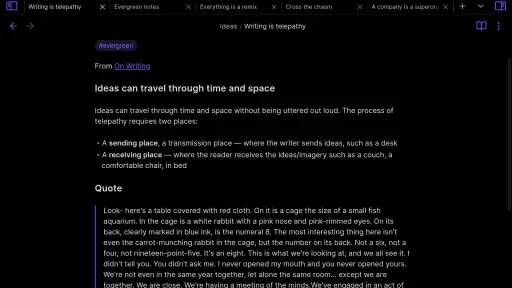
I came away from Obsidian with the feeling that it is less a conventional notes app and more a quiet workspace for building a personal library of plain-text ideas. That distinction matters. If you want a quick place to jot a shopping reminder, many simpler tools will feel faster. If you want notes that can grow into a connected collection of research, plans, references, and long-term thinking, this productivity app has a much stronger argument.
My main recommendation is straightforward: choose it when you care about ownership of your writing, flexible organization, and the ability to connect related thoughts without forcing everything into folders. Skip it if you expect a polished, guided system that explains every workflow immediately. Obsidian rewards patience. Its blank starting point is liberating for some people and slightly intimidating for others.
How Obsidian feels in everyday use
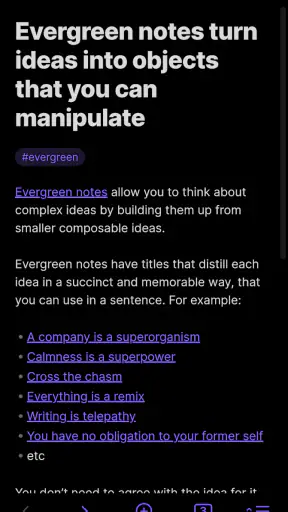
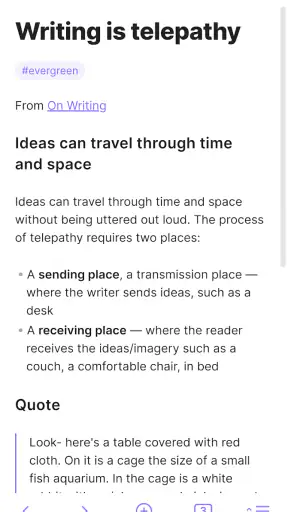
The app is built around plain-text notes, which gives the experience a refreshingly direct quality. I can open a note, write naturally, and keep the structure as simple or as detailed as I need. There is no pressure to decide the perfect folder arrangement before I begin. A note can start as a few rough lines and later become part of a larger knowledge system.
That flexibility is especially useful on a phone. I often begin with a small observation, a quotation I want to remember, or a task connected to a larger project. Instead of creating a separate app entry for every type of thought, I can place the information in a note and connect it to related material later. The mobile format is best when I already know what I want to capture; it is less comfortable when I am trying to design an entire system from a small screen.
The developer, Dynalist Inc., positions the product as a personal knowledge base, and that description fits better than calling it a basic memo pad. I see its value after several notes have accumulated. A single note may not feel remarkable, but a collection of linked notes can become a useful map of a subject, a project archive, or a private reference shelf.
Obsidian is free to install and suitable for Everyone, so there is little financial risk in trying it. Its Android release arrived on Jul 7, 2021, and the current version is 1.13.8. It runs on Android 5.1 or later, which makes it accessible on a broad range of devices. Those details do not tell me whether the workflow suits someone, but they do make experimentation easy.
A note system that grows instead of being rebuilt
The most convincing part of the experience is the way a note can change roles over time. I might first use one page as a rough meeting record, then connect it to a project note, a person note, and a list of decisions. That gradual development feels more natural than creating a rigid database before I know what information will matter.
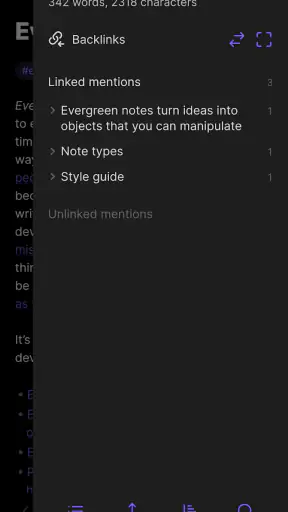
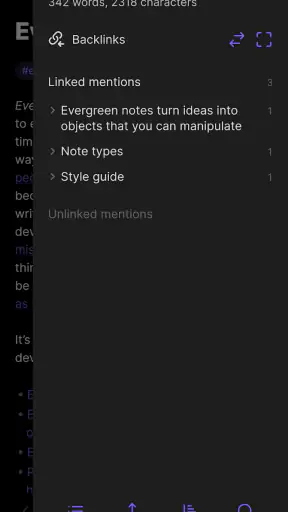
Links are the key idea. Rather than treating notes as isolated documents, I can connect one thought to another and follow those relationships later. This is useful for research because the important detail is often not just the fact itself, but the reason I saved it and the other ideas it relates to. A folder can tell me where a note was placed; a link can show me why it belongs with something else.
I also like the freedom to use different levels of structure at once. One note can be a clean outline, another can be a rough journal entry, and another can act as an index for a subject. I do not have to force all three into the same template. That makes the app suitable for people whose projects change shape, such as students, writers, developers, researchers, and anyone managing a complicated personal hobby.
There is a useful trade-off here: flexibility gives me control, but it also makes me responsible for creating sensible habits. If I save everything without naming notes clearly or linking related material, the vault can become difficult to navigate. Obsidian does not magically organize careless input. Its strength appears when I spend a little time deciding how I want to retrieve information later.
A realistic phone workflow
Imagine I am planning a small home renovation. On the bus, I write down a measurement and a question about lighting. Later, I add a note about paint choices, connect it to the room plan, and keep a list of decisions that still need checking. A week afterward, I can return to the project and see the reasoning behind the choices instead of finding disconnected scraps in several apps.
That workflow is more valuable than it sounds because it separates capture from refinement. On the phone, I can record the thought before it disappears. When I have more time, I can clean up the wording, add links, and turn the rough note into something reusable. I do not need every entry to be perfect at the moment of capture.
For study, I would use a similar approach. A lecture note could link to definitions, examples, questions, and later corrections. The benefit is not simply storing more text; it is making the relationships visible enough that review becomes easier. I would still want a dedicated calendar or task manager for time-sensitive reminders, because a knowledge base is not automatically a good replacement for every specialized tool.
Why plain text changes the decision
Plain text sounds modest, but it affects how I think about the app. The emphasis is on writing and structure rather than on decorative formatting. That can make the material feel durable and portable in a way that heavily designed note systems sometimes do not. I am less dependent on a particular visual layout and more focused on the actual content and its connections.
For a long-term archive, that is reassuring. I can write notes that are likely to remain understandable even if my organizational preferences change. It also encourages me to keep the content readable rather than burying it under elaborate presentation. People who want a simple, text-centered foundation will probably appreciate this approach.
However, plain text is not the right answer for every project. If my priority is producing a visually polished document, collaborating in real time, or laying out a presentation-ready page, a conventional document editor may be more comfortable. Obsidian can support thoughtful writing, but it does not remove the need for a tool designed around publishing or teamwork.
The learning curve is real
The biggest weakness is not that the app lacks potential; it is that the potential can be hidden behind an initially empty workspace. A newcomer may open it and wonder what the intended structure is. Should notes be organized by folders, links, tags, or a mixture? How much detail belongs in a daily note? When is a simple page better than a connected group of pages?
I had to resist the temptation to design an elaborate system before using the app. My best results came from starting with a few practical notes and adding structure only when a real problem appeared. That is advice I would give to anyone installing it: do not spend the first session building a perfect knowledge architecture. Write something useful first, then notice what you need to find again.
Another source of friction is that flexibility can create maintenance work. A growing collection benefits from consistent names, meaningful links, and occasional cleanup. If I abandon those habits, search becomes more important and the carefully imagined network becomes less helpful. The app gives me tools for thinking, but it does not make organizational decisions on my behalf.
This is also why I would not recommend it as the first choice for someone who only wants a fast checklist. A lightweight task app will usually provide less setup and a clearer path from opening the app to checking an item off. Obsidian becomes worthwhile when the information needs context, history, or connections beyond a simple completion state.
Where it beats familiar alternatives
Compared with a standard folder-based notes app, Obsidian feels better suited to information that belongs in several places at once. A research note might relate to a book, a project, a person, and a future article. Duplicating it into multiple folders creates confusion; linking it lets the same source remain central while still being reachable from different directions.
Compared with a document editor, it is less focused on producing a finished page and more focused on developing a body of ideas. I would choose a document editor for a formal letter or a polished report. I would choose Obsidian for the notes that come before the report: questions, fragments, references, decisions, and connections that may later become a finished piece.
Compared with a task manager, it handles background knowledge better but immediate action less directly. A project note can explain why a task exists and collect the relevant material, while a task app is usually better at deadlines, recurring actions, and quick status changes. In my experience, the most sensible arrangement is often to let each tool do the job it was designed to do rather than forcing one app to become everything.
Compared with a highly structured database-style workspace, Obsidian feels more personal and less prescriptive. I can begin writing without choosing fields for every entry. The cost is that I lose some of the automatic order that a database provides. People who enjoy predefined tables and consistent records may find Obsidian too open-ended, while people who dislike being boxed into a schema may find that openness refreshing.
Small habits that make the app more useful
My first practical tip is to create a clear naming habit from the beginning. A title should tell me what the note contains when I see it weeks later. Vague labels may feel acceptable during a busy moment, but they make the archive harder to scan. I also try to write a short opening sentence that explains the note’s purpose, especially when the page is likely to grow.
Second, I avoid linking every related word just because I can. A useful link should help me move between ideas or retrieve context. If everything is connected indiscriminately, the network becomes noisy. I get more value from a smaller number of deliberate connections than from turning every sentence into a web of references.
Third, I separate temporary capture from durable knowledge. A quick thought can live in an inbox-style note until I decide whether it deserves its own page or a link to an existing one. This keeps the main collection readable without demanding that every idea be processed immediately. It is a simple workflow, but it prevents the app’s flexibility from turning into clutter.
For larger subjects, I find it helpful to maintain an index note that points toward the most important pages. Links are powerful when I know where to start, and an index gives me that starting point without forcing every note into a strict hierarchy. This is particularly useful for a long project where the relationships are rich but I still need a dependable overview.
I would also keep expectations realistic about mobile editing. The phone is excellent for capturing, reviewing, and making focused changes. It is less pleasant for reorganizing a large collection or designing a complex structure from scratch. My preferred pattern is to capture on mobile and do deeper maintenance when I have a larger screen and more uninterrupted attention.
Who should install it, and who should pass
I think Obsidian is a strong fit for independent learners, writers, students, researchers, and thoughtful planners who want their notes to remain useful beyond the day they were created. It is especially appealing to someone who has accumulated information across scattered documents and wants a more connected way to work with it.
It is also a good match for people who enjoy shaping their own tools. If you like experimenting with naming systems, indexes, linked notes, and personal workflows, the open design gives you room to build something that reflects how you think. The app does not insist that a reading list, a travel plan, and a research archive must look identical.
I would be more cautious recommending it to someone who wants instant structure. If you need shared editing, a polished presentation environment, or a task list that handles deadlines without much setup, another category of app may be a better fit. The same freedom that attracts experienced note-takers can feel like unnecessary work to someone who simply wants a ready-made system.
The audience rating of Everyone and the free price make it easy to test without committing money. I would spend several days using it for one real subject rather than judging it after creating a single note. The value becomes clearer when I return to older material and see whether the links, titles, and indexes actually help me recover context.
My final verdict
Obsidian succeeds because it treats notes as building blocks rather than disposable entries. In my experience, its best quality is the balance between a simple text foundation and a structure that can become surprisingly deep. I can start small, preserve rough ideas, and gradually develop a personal knowledge base without redesigning everything every time my project changes.
That strength comes with a clear condition: I have to participate in the organization. The app will not decide the perfect system for me, and its open workspace can expose weak habits quickly. I see that as a fair trade for control, but not everyone will agree. Some users will find the learning curve motivating; others will see it as an obstacle between them and a note.
With an average rating of 4.2 from around 18 thousand ratings and more than 5 million installs, it has clearly attracted a substantial audience, while the review count of about 1.3 thousand suggests plenty of public discussion around the experience. Those figures are useful context, but my recommendation depends more on fit than popularity.
My bottom line is that Obsidian is best for people who want to think with their notes, not merely store them. Install it if you are ready to build a calm, connected archive one useful note at a time. If you only need quick reminders, shared documents, or tightly managed tasks, choose a more specialized alternative. For the right reader, though, this app can turn scattered thoughts into a durable system that becomes more valuable the longer it is used.


